A cautionary tale of how piecemeal, uncoordinated network upgrades stall AI rollouts and the whole-network approach that keeps them on track.
The company below, its employees, and the exact sequence of events are fictional. Every technical dead end in this story, the wireless standard, the controller, the switch, the cable, the server, the security requirement — is a real, common way AI rollouts stall inside real IT organizations. Names have been invented; the pattern hasn’t.
Why AI Rollouts Stall Before They Start
Most AI initiatives don’t fail because the technology is bad. They fail because the network infrastructure underneath them gets upgraded one silo at a time, without a plan for the whole. Each unplanned upgrade solves one problem and quietly reveals the next until the budget is gone and the rollout stalls. Building AI-ready network infrastructure isn’t about buying faster gear; it’s about sequencing the entire network: wireless, switching, cabling, servers, and security — in the right order, before the first purchase order goes out.
Nobody in this story is incompetent. Nobody breaks a rule. Every single approval makes sense in isolation. That’s what makes it worth reading closely: the failure isn’t a bad decision, it’s the absence of anyone accountable for seeing all the decisions at once.
Part One: The Simple Upgrade
Marcus Feld, VP of Sales at Anchor Bay Industrial Supply, had already gotten budget approval for the year’s boldest idea: put AI-enabled laptops in the hands of every rep on his team. The new machines were fast, AI-ready, and came standard with Wi-Fi 7 wireless and multi-gig ethernet ports — exactly the kind of connectivity his team would need to run demanding AI sales tools without lag.
Marcus didn’t loop in IT operations before placing the order. Why would he? The budget was his, the vendor relationship was his, and laptops were just hardware. He signed the purchase order and had forty new machines on desks within three weeks.
The rollout did not go the way he pictured. Reps immediately complained about sluggish performance, dropped connections, and AI tools that timed out mid-query. It was the opposite of the experience Marcus had promised his team.
Waterfall effect — hardware incompatibility #1
Eventually the picture came into focus: Anchor Bay’s wireless network was a mix of older, controller-based Wi-Fi 5 and Wi-Fi 6 access points. None of it supported Wi-Fi 7. The new laptops were capable of speeds the existing network had no way to deliver. Some of the wireless infrastructure was only a couple of years old, but not one access point was built for Wi-Fi 7.
Part Two: The Access Point Gambit
With the sales organization breathing down her neck, wireless manager Priya Nandan did what felt responsible: she submitted a special budget request for enough Wi-Fi 7 access points to cover the sales team’s office area. Nobody else in IT operations was consulted — in her mind, this was a wireless problem with a wireless solution.
Finance pushed back hard; the request wasn’t in the plan. But with a sales VP escalating, finance approved it by reallocating unused funds from the Network Switch Team’s budget.
Waterfall effect — hardware incompatibility #2
The new access points arrived and the existing wireless controller didn’t support Wi-Fi 7 hardware at all. The new access points couldn’t even be added to the network.
Part Three: The Controller Chase
Priya went back to finance for a new wireless controller capable of managing the Wi-Fi 7 access points while still supporting the older units. The Switch Team’s budget had already been tapped once; now the rest of it was reallocated to cover the controller.
Waterfall effect — hardware incompatibility #3
The controller installed fine. But the new access points wouldn’t power on. The switch team’s diagnosis revealed two problems at once: the access points needed far more Power over Ethernet than the existing switches could deliver, and they required multi-gig connections the current switches didn’t support either.
Part Four: The Switch Scramble
Switch Team manager Dale Osei submitted a request for new switches capable of powering and connecting the Wi-Fi 7 access points. Finance denied it, his remaining budget had already gone toward the unplanned wireless upgrades. He escalated; finance reallocated funds that hadn’t yet been used by the Server Team, and the switches were ordered.
Waterfall effect — hardware incompatibility #4
The new switches installed, but the access points began connecting and disconnecting in a maddening cycle. The answer, when it finally came, wasn’t hardware at all — it was cabling. The office’s Cat5 cabling, installed a decade earlier and never questioned since, could not carry the multi-gig bandwidth or higher PoE power the new access points required. Every run in the building would need to be replaced.
Part Five: The Cabling Reckoning
Dale submitted yet another special request — a full cabling replacement. Finance had one option left: reallocate the remaining budget from the Security Team. It was approved, and the cabling project began.
Waterfall effect — additional AI dependencies discovered
With reliable access finally in place, a new problem surfaced. To get acceptable AI query performance and avoid runaway cloud storage costs, Marcus’s team needed more on-premises horsepower — specifically, more database server storage and memory. Existing servers were already maxed out. New servers would be required.
Part Six: The Server Squeeze
Server Team manager Carla Jimenez specced out a high-performance platform with fast 32-gigabit connections to the storage switch network. Finance had bad news: there was no budget left, it had all gone toward the wireless access points, controller, and switches. Finance reallocated what remained of the Security Team’s budget and approved the purchase.
Waterfall effect — hardware incompatibility #5
The new servers arrived — only for the team to discover the existing storage switches didn’t support 32-gigabit connections, and there was no budget left to replace them. The servers’ network cards were backward-compatible with the older 16-gigabit switches, so they’d run, just not at full speed. A faster storage switch upgrade would have to wait for next year.
Waterfall effect — additional AI security requirements discovered
With every piece of infrastructure finally in place, the sales team tried to log in. The AI platform required two-factor authentication licenses the company didn’t have. On top of that, reps were still hitting intermittent connectivity issues, issues the wireless team could barely diagnose because their legacy, controller-based platform offered almost none of the visibility or automated diagnostics that modern AI-enabled wireless tools provide.
Part Seven: The Empty Vault
Security Team manager Tom Whitlock submitted a request for the 2FA subscriptions the sales team now needed to actually use the AI platform. Finance’s answer was final: there was nothing left. Every dollar of the IT budget had been reallocated — first the Switch Team, then the Server Team, then the Security Team, twice over.
The AI initiative that started with a simple laptop order was put on hold indefinitely. Not because the technology didn’t work. Not because the idea was bad. Because seven separate teams had each made a reasonable decision in isolation, and none of them had the visibility to see where it would lead.
The Waterfall at a Glance
Seven parts, seven silos, one unbroken chain of cause and effect — each fix solving one problem and revealing the next, until the budget ran out:
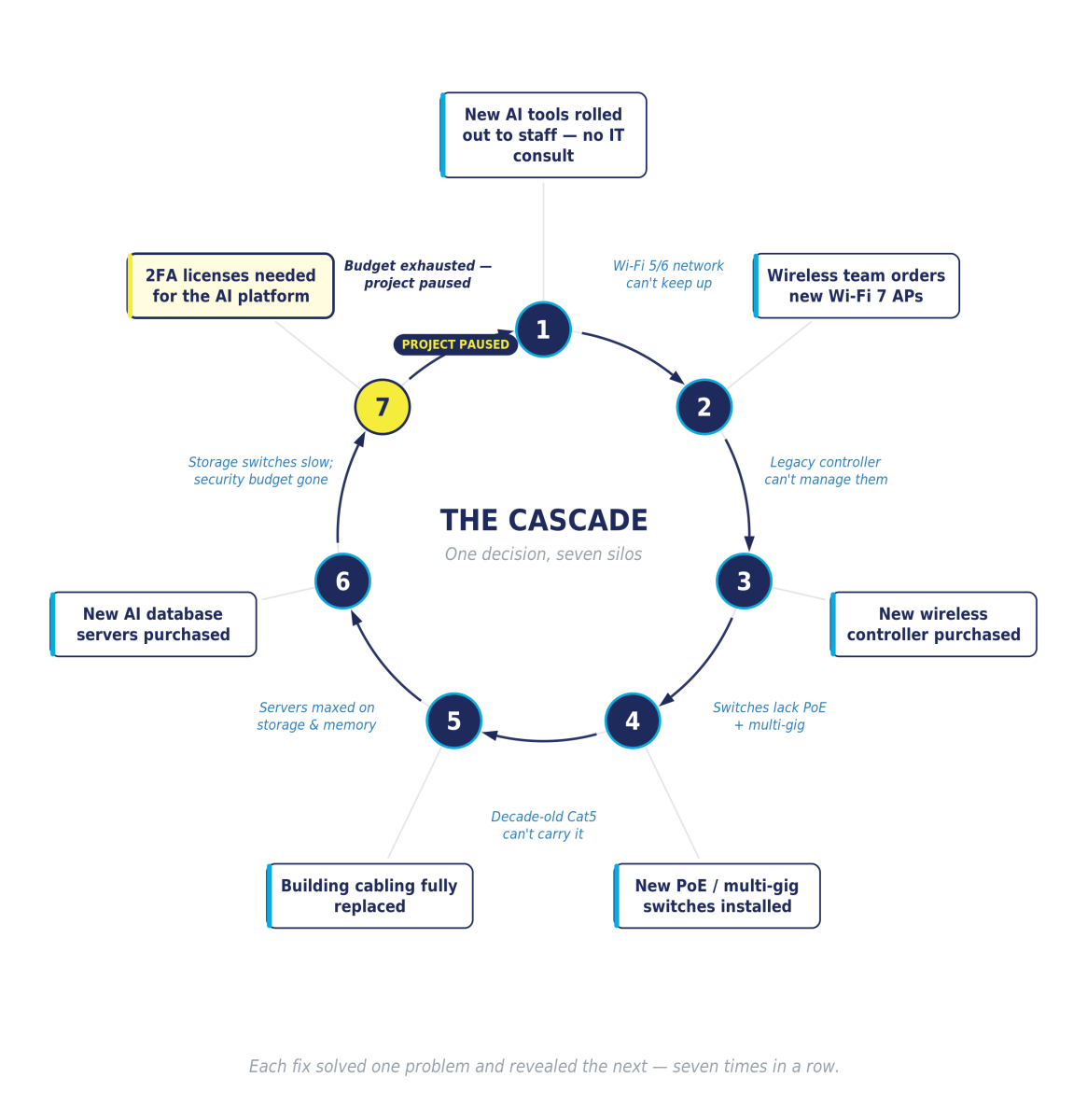
- AI tools rolled out to staff → network can’t deliver the speeds they need.
- Wi-Fi 7 access points bought → controller can’t manage them.
- New controller installed → switches can’t power or connect the APs.
- New switches installed → decade-old Cat5 cabling can’t carry the load.
- Cabling replaced → servers max out on storage and memory.
- New servers ordered → storage switches don’t support 32-gig links.
- Everything in place → no 2FA licenses and no budget left to buy them.
What This Teaches Us About AI-Ready Network Infrastructure
Anchor Bay’s story is fiction, but the pattern is not. It’s a composite of what happens when good, well-intentioned technology decisions are made one silo at a time. A few lessons stand out for any team planning an AI network readiness assessment:
- Siloed decisions no longer work in an interdependent, AI-enabled network. A single department’s technology choice can have enormous downstream impacts — impacts nobody sees coming because no one consulted the full IT organization before acting.
- Nothing stays “good enough” for long. Wireless standards, switch capacity, and cabling that were perfectly sufficient a few years ago can become the bottleneck that stalls an entire initiative.
- Modern hardware demands modern tools. AI-enabled switches, wireless platforms, and security tools exist specifically to pinpoint issues like these quickly — old methods aren’t sufficient for teams already stretched thin.
- Negative waterfall effects spread fast. That’s exactly why a holistic, planned approach to AI and infrastructure projects matters more than ever.
- A phased rollout beats a scramble. Even when a full upgrade can’t fit in one year’s budget, a properly phased, integrated rollout across multiple budget cycles prevents unplanned, disjointed spending.
- Brand-agnostic vendor selection pays off. Evaluating options for true single-pane-of-glass management, best-in-class performance, and capabilities the incumbent doesn’t offer matters more today than ever.
How to Build an AI-Ready Network the Right Way
None of this had to happen. Every decision, taken on its own, was reasonable. The failure wasn’t any one choice — it was the absence of anyone positioned to see all of them at once, before the first purchase order ever went out.
That’s exactly the gap Trifecta Networks is built to close. A pre-project network assessment would have mapped Anchor Bay’s wireless, switching, cabling, server, and security posture against what an AI-ready sales rollout actually requires: surfacing the Wi-Fi 7 mismatch, the aging Cat5 cabling, and the 2FA licensing gap in week one instead of month eleven. A phased, multi-year roadmap would have spread those investments across budget cycles the business could actually afford, instead of raiding four other teams’ budgets to cover surprises.
A single, brand-agnostic point of ownership over the whole network instead of five managers each defending their own slice would have caught the second incompatibility before it became the fifth.
Frequently Asked Questions
What is AI-ready network infrastructure?
AI-ready network infrastructure is a network — wireless, switching, cabling, servers, and security — designed to handle the bandwidth, power, low latency, and data demands of AI tools and workloads. It accounts for standards like Wi-Fi 7, multi-gig switching, higher PoE, modern cabling, and the identity/security controls AI platforms require.
Why do AI rollouts fail?
AI rollouts most often stall not because of the AI itself, but because of unplanned infrastructure dependencies — outdated wireless, insufficient PoE, aging cabling, maxed-out servers, or missing security licenses — that surface one at a time when decisions are made in silos.
What is an AI network readiness assessment?
It’s a pre-project evaluation that maps your current wireless, switching, cabling, server, and security posture against what your AI initiative actually requires — surfacing gaps and sequencing a phased, budget-aligned upgrade path before any hardware is purchased. Trifecta delivers this through its professional services team.
Planning network upgrades for an AI rollout?
Trifecta Networks has guided thousands of customers through exactly this kind of network modernization, sequenced around the whole network, not whichever department is asking loudest. Book a Trifecta AI-Ready Network Assessment before your version of Anchor Bay’s story writes itself.